OpenAI's First Physical Device Is Here, and It's Not What Anyone Expected
By Khushal Charaniya · July 16, 2026 · 8 min read
Everyone assumed OpenAI's first gadget would be the mysterious screenless speaker Jony Ive is supposedly building. Instead, the company's actual hardware debut is a lot less glamorous: a $230 keypad for people who spend their day supervising AI coding agents.
It's called Codex Micro, and it says a lot about where OpenAI thinks the money is right now — not in a living room companion, but on the desks of developers who are already running several Codex agents at once and need a faster way to keep tabs on them.
What Exactly Is Codex Micro?
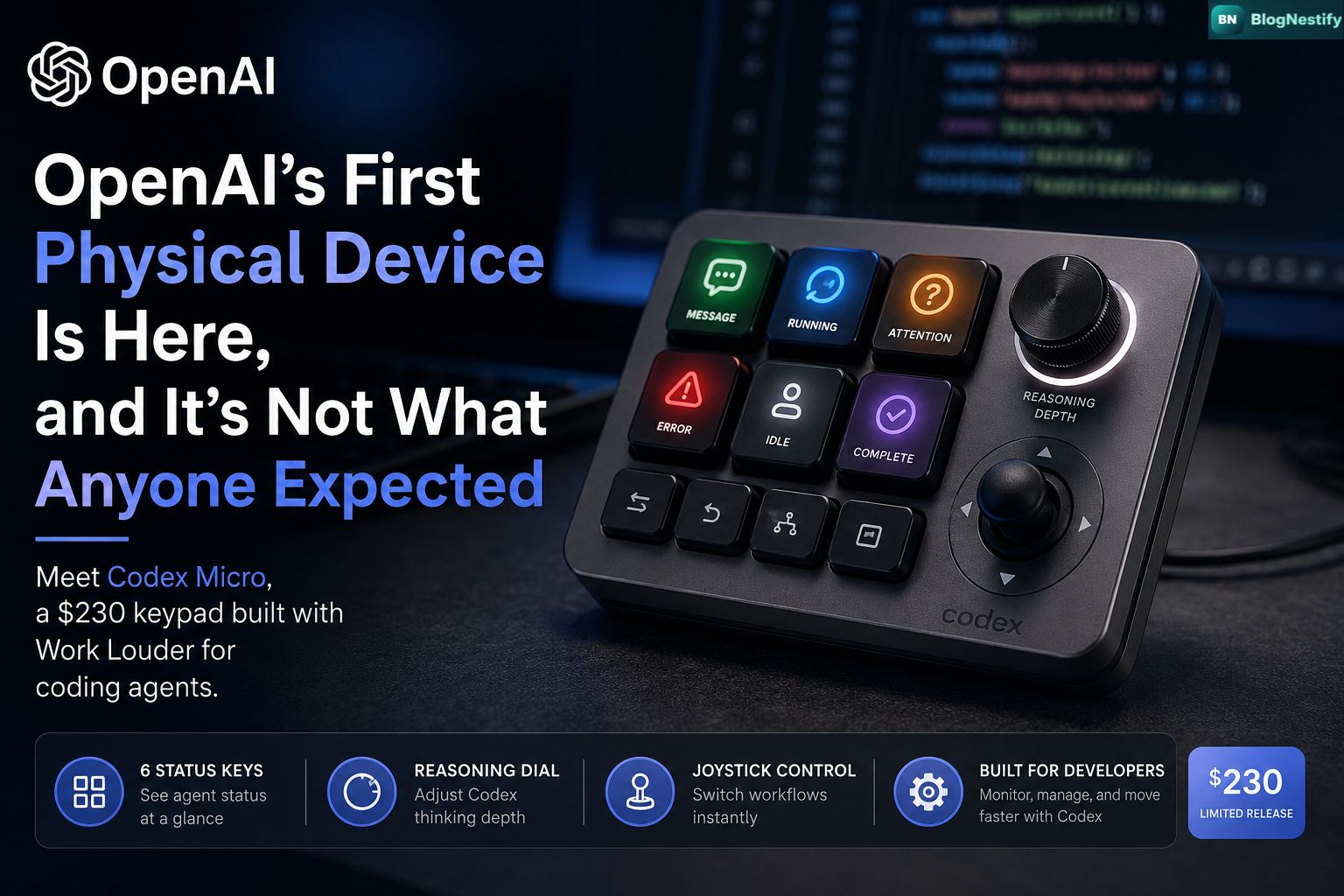
Codex Micro is a small, square macro pad — officially labeled kbd-1.0-codex-micro — built in partnership with Work Louder, a boutique keyboard maker better known among designers and video editors for compact control surfaces like the Creator Micro 2. OpenAI didn't build this from scratch; it leaned on a company that already understood how to make a satisfying physical dial.
The pad sits next to a regular keyboard and gives Codex users a physical shortcut layer: six backlit keys, a rotary knob, and a small joystick. It's not meant to replace typing. It's meant to replace tab-switching between five different agent windows to figure out which one actually needs you.
Quick answer: Codex Micro is a $230 desktop keypad from OpenAI and Work Louder that lets developers monitor and control multiple Codex coding agents through physical keys, a reasoning dial, and a joystick, instead of clicking through browser tabs.
Specs and What's in the Box
| Price | $230, available to order now |
| Maker | Work Louder, in partnership with OpenAI |
| Inputs | 13 mechanical switches, 1 touch sensor, 1 rotary encoder, 1 planar joystick |
| Build | CNC polycarbonate and aluminum body, sandblasted anodized base, PBT/PC keycaps, rubber joystick cap, POM/POK switches |
| Switch options | Clicky and silent variants |
| Keycaps included | 32 custom Codex icon caps plus additional solid-color caps for remapping |
| Software | Programmable through Work Louder's Input software, including layered workflow groups |
The Six Lights That Do the Real Work
The clever part of Codex Micro isn't the joystick, it's the six illuminated keys that act as a status board for your agents. Each one lights up in a color that maps to what an agent is currently doing:
- Green — the agent has an unread message waiting for you
- Blue — the agent is actively thinking or running
- Orange — the agent needs approval or has a question
- Red — something has errored out
That's the whole pitch, really. If you're the kind of developer who hands an agent a task and walks away to do something else, Codex Micro is a way to know at a glance whether it's still fine, or whether it's been stuck on an error for the last twenty minutes without you noticing. The rotary dial adjusts how much reasoning effort Codex applies to a task — dial it down for a quick fix, crank it up when the problem is genuinely hard — and the joystick jumps between preset workflows like reviewing a pull request, debugging an error, or refactoring a block of code.
Why a Keypad, and Why Now?
I'll be honest, my first reaction to this launch was mild disappointment. Everyone, myself included, has spent the past several months half-expecting OpenAI's "first device" to be the rumored AI companion gadget — a screenless, ambient speaker reportedly built with io Products, the hardware startup founded by former Apple design chief Jony Ive, whom OpenAI acquired last year. Bloomberg has reported that device could be unveiled later this year for a 2027 release, with the ability to play media, control smart home appliances, and act as a conversational presence in a room.
That project has also picked up legal baggage it didn't ask for. Apple sued OpenAI, io Products, and two former Apple employees, alleging they took manufacturing trade secrets tied to products Apple hasn't shipped yet. None of that touches Codex Micro. It's a straightforward accessory with a named collaborator, a real price tag, and a buy button that works today — which, compared to a lawsuit-adjacent speaker with a vague 2027 timeline, is a genuinely low-drama way to say "we made a physical thing."
There's also a practical read here. OpenAI recently folded Codex into a broader "super app" alongside ChatGPT and a new productivity tool called ChatGPT Work. As more of a developer's day gets handed off to autonomous agents, the bottleneck stops being how fast you can type and starts being how fast you can notice when an agent needs a decision from you. A keypad solves a narrow, real problem for a narrow, well-defined audience: people running Codex agents most of the day.
How It Compares to Other Hardware Shortcuts
This isn't the first time a company has tried to put AI on a physical button. Microsoft added a dedicated Copilot key to Windows keyboards back in January 2024, but that was just one button for summoning a chat window. Codex Micro is a different animal entirely — a full control surface with status feedback, adjustable reasoning, and workflow switching, built for people who treat agents less like a chatbot and more like a small team they're managing. It's also less a general-purpose macro pad than Work Louder's other products, like the Creator Micro 2 or the Framer Micro built for the website builder Framer, because OpenAI wired it directly into Codex's live agent state rather than just sending generic keystrokes.
Who Should Actually Buy This
Codex Micro is not a mainstream gadget, and neither OpenAI nor Work Louder is pretending otherwise. Both companies have flagged it as a limited-quantity release rather than a permanent product line, which suggests this is closer to a merch drop for power users than a mass-market accessory.
Worth it if:
- You regularly run two or more Codex agents at the same time
- You're constantly switching reasoning depth between quick fixes and hard problems
- You want a glanceable status board instead of checking browser tabs
Skip it if:
- You use Codex occasionally rather than as a daily driver
- You're waiting to see how OpenAI's broader hardware plans shake out
- $230 for a keypad feels steep for what amounts to a nicer set of shortcuts
Whether the integration stays worth it long-term depends on something we can't fully judge yet: how completely OpenAI keeps exposing live agent state and actions to the hardware as Codex itself evolves. A keypad is only as good as the software feeding it.
Key Takeaways
- Codex Micro is OpenAI's first shipping hardware product, built with Work Louder, priced at $230.
- It's a control surface for Codex coding agents, not a general keyboard or the rumored AI companion device.
- Six status keys, a reasoning dial, and a joystick let developers monitor and steer multiple agents at once.
- OpenAI's separate screenless speaker project, tied to former Apple design chief Jony Ive's io Products, remains unreleased and is now entangled in an Apple lawsuit.
- It's a limited-quantity niche accessory aimed squarely at heavy Codex users, not a mass-market launch.
Frequently Asked Questions
What is OpenAI's Codex Micro?
A $230 programmable keypad OpenAI built with Work Louder that gives Codex users physical controls — status lights, a reasoning dial, and a joystick — for monitoring and directing AI coding agents.
Is Codex Micro OpenAI's first hardware product?
Yes. It's the first physical device the company has actually shipped. The more talked-about project, a screenless AI companion speaker developed with io Products, hasn't launched and reportedly isn't expected before 2027.
How much does Codex Micro cost?
$230, orderable directly from OpenAI or Work Louder, with both describing it as a limited-quantity release.
What can you actually do with it?
Accept or reject agent-generated code, adjust Codex's reasoning depth with the dial, jump between workflows like debugging or refactoring with the joystick, and read agent status at a glance from the six colored keys.
Khushal Charaniya
Founder and Editor of Blognestify, covering technology, AI, cybersecurity, business, and global affairs. Read more at his author profile.
0 Comments
Leave a Comment